For client sites built with Claude Code or Cursor
Your client points at it. Your AI fixes it. Your client confirms it.
DevPin puts a Feedback button on the site you are building. Your client clicks what is wrong and says why. Your AI coding tool reads it as a ready work order, makes the fix and marks it done. Your client gets an email to check it. No more screenshots in email threads.
Free for one project. Unlimited reviewers on every plan. Your client never needs an account.
No install, no account
Try it on your own site
Enter your site's address and pin a note on it right now. Nothing is installed on your site and nothing is saved: your notes stay in your browser.
Want a client to review a site before your script is on it? Create a free project, add the site's address, and send them the review link. Their notes land in your dashboard.
How it works
One piece of feedback, from your client to a confirmed fix
A real run on a sample checkout page. Every picture below is the product itself.
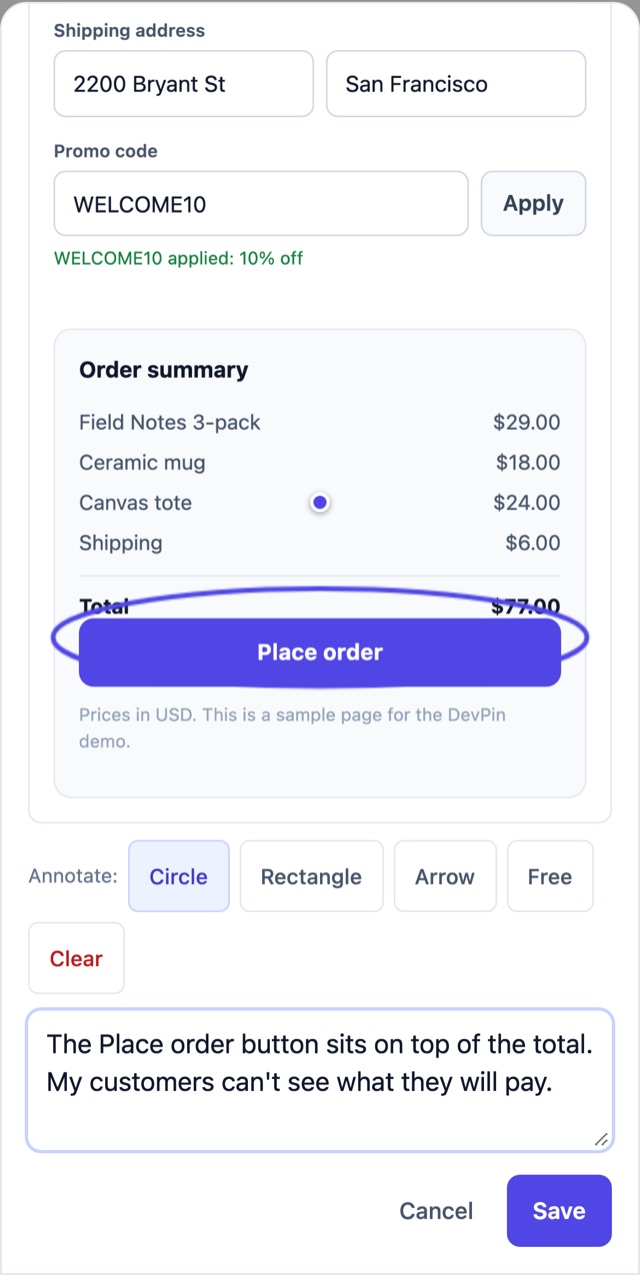
Your client points at the problem
They press Feedback, tap the broken part of the page and write what is wrong in their own words. DevPin takes the screenshot, lets them circle the problem, and quietly adds the browser, the device and the element they tapped. On a computer they can also record up to 30 seconds of the screen.
Your AI coding tool gets a work order
Connect Claude Code or Cursor to
https://devpin.app/mcpwith one command and a project token. Ask it to fix the open feedback and it reads each pin like this, with the page, the element, the screenshot and the errors the browser logged. Nothing to install. Your AI runs on your machine with your own keys; DevPin never sees your code.Claude Code, one time setup claude mcp add --transport http devpin https://devpin.app/mcp \ --header "Authorization: Bearer devpin_yourtoken"
What your AI receives (get_feedback) id: eeb8735b-9f41-498c-a081-a453a2b3c29b page: https://staging.northwind.test/checkout (Checkout | Northwind Supply) element: <button#place-order> Place order selector: main > aside.summary > button#place-order position: click (195, 595); viewport 390x844 status: open reporter: dana@northwind-client.test environment: Safari 18, iOS 18, mobile, screen 390x844, pixel ratio 3 screenshot (link valid for 1 hour, includes the reviewer's drawing): https://…/pin-screenshots/…/homepage-before.png feedback: The Place order button sits on top of the total. My customers can't see what they will pay. console errors and warnings before the report (1): - [warning] Layout shift: aside.summary moved 6px after fonts loaded failed network requests: none captured
It fixes it and marks it done
After the change, your AI marks the pin fixed with a note for you, a link to the preview where the client can see it, and a picture of the fixed page. You can also press Mark fixed yourself, or close the issue in GitHub, Linear or Jira.
Your AI, after the fix (resolve_feedback) resolve_feedback pinId: eeb8735b-9f41-498c-a081-a453a2b3c29b note: Checkout.tsx: removed the negative top margin on the Place order button so it sits below the total. preview_url: https://northwind-git-fix-checkout.vercel.app/checkout after_screenshot_url: data:image/png;base64,… Pin eeb8735b-… is now addressed. Your note is on the pin. Asked 1 reviewer(s) to check the fix by email.Your client confirms it
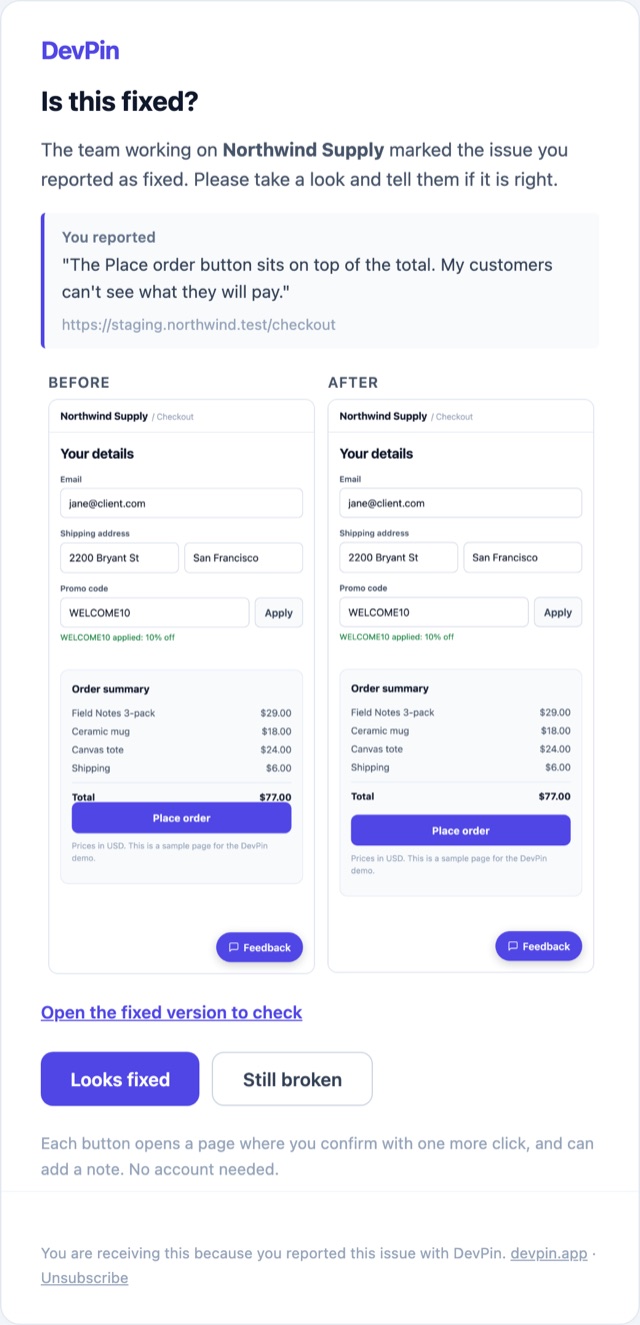
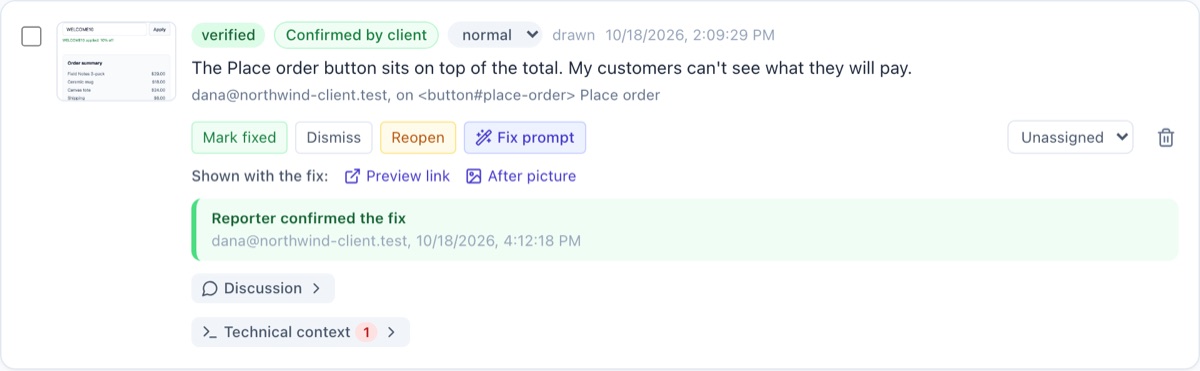
Your client gets this email: what they reported, before and after side by side when you add a picture of the fix, and two buttons. Looks fixed closes it. Still broken reopens it with their note and tells you. No account, no password. Your dashboard shows which fixes the client has confirmed.
After they press Looks fixed, in your dashboard:
Close the round with a sign-off
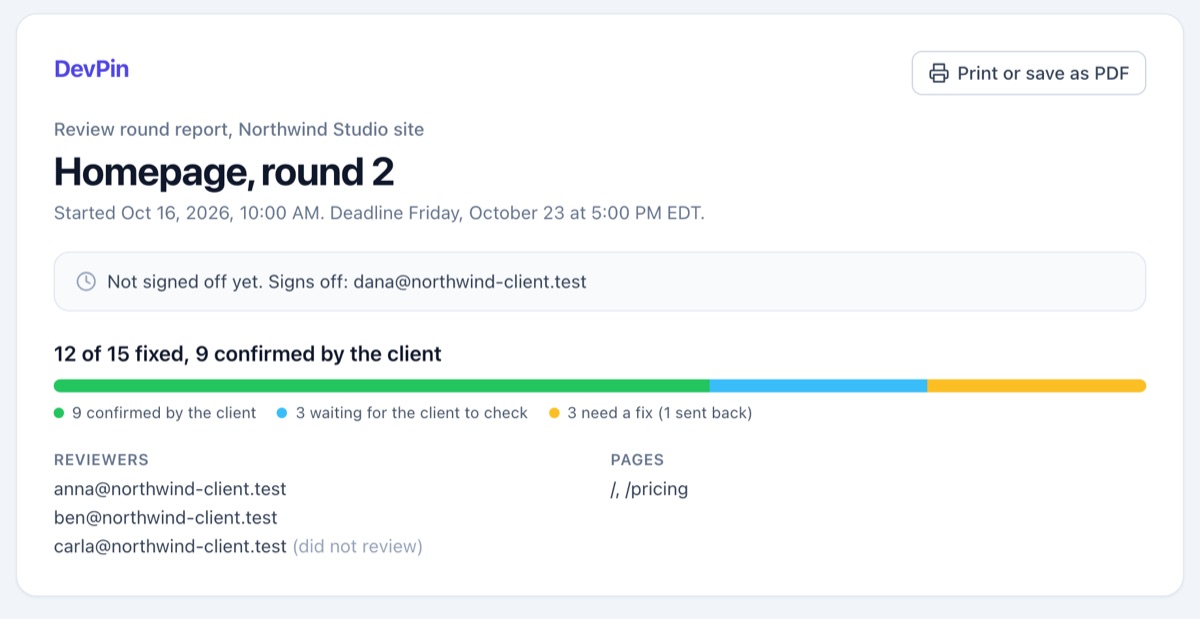
Group a batch of review into a round, such as "Homepage, round 2", with a deadline. DevPin reminds the reviewers who have not looked, shows how many items are fixed and confirmed, asks your client to sign off when everything is done, and gives you a report to send them.
Why not just Vercel or Netlify comments?
If your whole team works on one of those platforms and only reviews its preview deploys, their built-in comments may be all you need. DevPin is for the rest of the job:
Any host, and the live site
One script tag works on Vercel, Netlify, Render, your own server or a WordPress site, on previews, staging and production. No script yet? Send a review link instead.
Clients need no seat or account
Your client types their email once and starts pointing. Every plan includes unlimited reviewers, so inviting the whole client team costs nothing extra.
Ready for your AI coding tool
Each pin reaches Claude Code or Cursor as a work order through devpin.app/mcp: page, element, selector, screenshot, browser, console errors and failed requests. One click files a GitHub issue tagged @claude so the Claude Code Action opens a pull request.
Your client confirms the fix
When a pin is marked fixed, your client gets an email with their screenshot, your picture of the fix when you add one, and two buttons: Looks fixed or Still broken. Rounds end with their sign-off.
What every pin carries
Enough for you, or your AI, to fix it without asking the client again.
Screenshot and drawing
The visible screen, with circles, boxes and arrows from your client.
Screen recording
Up to 30 seconds of "I click here, then this happens". Pro.
What the browser saw
Browser, device, screen size, the element and its selector, recent console errors and failed requests.
Works on phones
Your client can pin and draw with a finger.
Two-way tracker sync
Export a pin to GitHub, Linear or Jira. With Pro, closing the issue there marks the pin fixed.
Review any site
A review link or a bookmark lets a client comment before the script is installed.
Running an agency?
Put your name on the review, and get the sign-off in writing.
White label
Your client sees your studio name on the confirm page and the emails, not ours.
Approval mode
Clients approve each page or ask for changes, with a sign-off log you can point to.
Review rounds
"Homepage, round 2": invite reviewers, set a deadline, track every fix, and send the client a report to sign off.
Team plan
$59/month
- White label
- Approval mode
- Review rounds and reports
- Everything in Pro
- Unlimited reviewers
Simple pricing, no seats
Unlimited reviewers and pins on every plan. Your clients never need an account or a seat. Paid plan features are free during early access, except white label, which needs the Team plan.
Free
Try it on one client site
$0/month
no card needed
- 1 project
- Unlimited reviewers and pins
- Pins with screenshot, drawing and browser details
- Fix prompts and bug reports
- Hosted MCP server for Claude Code and Cursor
- Export to GitHub, Linear and Jira
- Client confirms each fix by email
Pro
For freelancers building client sites
$19/month
flat price, any number of reviewers
- Unlimited projects
- Review rounds with client sign-off
- Screen recordings, up to 30 seconds
- Two-way sync with GitHub, Linear and Jira
- AI-polished fix prompts (coming soon)
Team
For agencies and studios
$59/month
flat price, any number of reviewers
- Everything in Pro
- Approval mode: clients approve each page
- White label: your name on review pages and emails
- Priority support
Questions people ask
- Does my client need an account to leave feedback?
- No. Your client types their email once and starts pointing. Every plan includes unlimited reviewers, so inviting the whole client team costs nothing extra.
- Which sites does DevPin work on?
- Any site. One script tag works on Vercel, Netlify, Render, your own server or a WordPress site, on previews, staging and production. Without the script, you can send your client a review link instead.
- How does Claude Code or Cursor get the feedback?
- Each pin reaches your AI coding tool as a work order through the DevPin MCP server at devpin.app/mcp. The work order holds the page, the element and its selector, the screenshot, the browser, and recent console errors and failed requests.
- How does my client confirm a fix?
- When a pin is marked fixed, your client gets an email with their screenshot, your picture of the fix when you add one, and two buttons: Looks fixed or Still broken.
- What does each pin include?
- The visible screen with the drawing your client made, the browser, device and screen size, the element and its selector, and recent console errors and failed requests. On Pro, a pin can also carry a screen recording of up to 30 seconds.
- Is there a free plan?
- Yes. The Free plan covers one project with unlimited reviewers and pins, the hosted MCP server, export to GitHub, Linear and Jira, and email confirmation of each fix.
Send your client one link this week.
Add one script tag or send a review link, connect your AI tool, and turn the next round of feedback into fixes your client has confirmed.
Start free